
New elective this semester: AI-drevne applikationer, or AIDA if you like acronyms. Week one, session two and three: Retrieval-Augmented Generation. Or RAG, because apparently every AI term needs to fit in three letters.
I’d used RAG-powered tools before without really knowing it. Ask any documentation chatbot a question and get an answer with a link back to the docs page — that’s RAG. But “I’ve used it” and “I could build one” turned out to be very different sentences. So the second half of this post is what happened when I tried.
What RAG Actually Is#
Here’s the one-line version: a chatbot answers from what it was trained on. A RAG system first goes and finds relevant material, then asks the model to answer using only that material.
The formula I keep coming back to: RAG = your documents + an LLM.
That’s the whole pitch. A general-purpose model can tell you plenty about the world, but it has never seen your company’s internal wiki, your study program’s curriculum, or — in my case a few weeks later — the contents of my own portfolio site. RAG is how you get a model to answer questions about things it was never trained on, without retraining it.
The mechanics behind that:
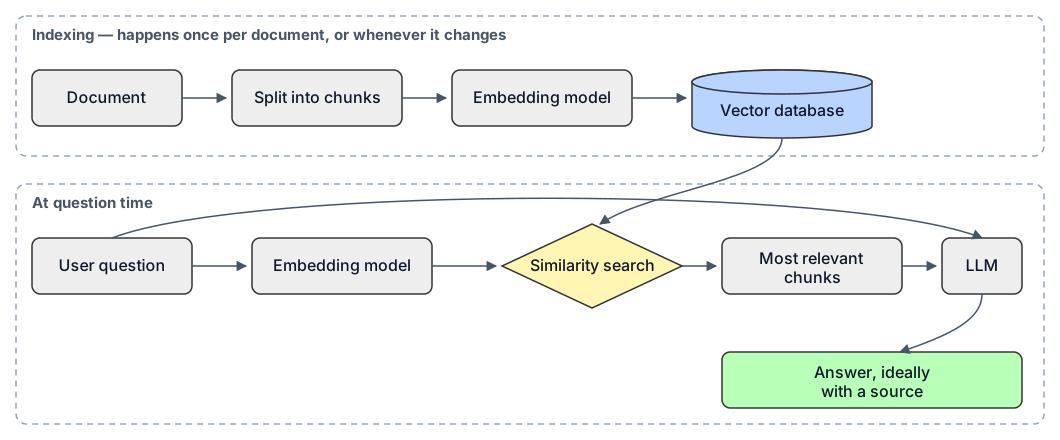
Five steps, really: chunk the document into pieces, turn each piece into an embedding (a vector that represents its meaning), store those vectors, and then at question time embed the question the same way and search for the chunks that are most similar. Whatever comes back gets handed to the LLM as context, and it writes the actual answer from that.
The embedding and vector-search step is the one I’d underestimated going in. It’s also where most of what goes wrong actually goes wrong, as the rest of this post is about to demonstrate at length.
When RAG Is Worth It (and When It’s Just Overhead)#
RAG earns its complexity when you actually want to constrain what the model answers from — your own knowledge scattered across many documents, updated often enough that retraining a model would be absurd, and specific enough that you’d rather it say “I don’t know” than improvise.
It’s not worth it when a plain, ungrounded model would answer just as well. Bolting a retrieval pipeline onto a question the base model could already answer correctly is just a slower, more expensive way to get the same answer.
My First RAG Bot: Studie Sheriff#
For the hands-on part of the assignment I built a chatbot — “Studie Sheriff” — trained only on my own study program’s studieordning (the official curriculum document for the Datamatiker degree at Cphbusiness). The goal: answer questions about the program strictly from that document, cite where the answer came from, and never make something up.
Stack: the PDF converted to markdown, chunked, embedded with OpenAI’s text-embedding-3-small, answered by gpt-4o-mini, all wired up in Dify.
Simple enough on paper. Then I actually tried to run it.
When Everything Errored: model_currently_not_support#
My first dozen attempts at a single chat message all failed with the same cryptic error. Dify Cloud’s free trial credits didn’t cover the specific combination of models I’d picked — but the error message didn’t say which piece was the problem.
So I did what you do when a black box breaks: opened the browser’s Network tab and read the raw response instead of trusting the UI. That confirmed it was a model-support issue, but still not which model.
The thing I hadn’t appreciated yet: a single RAG answer touches at least three separate models — the embedding model, the chat model, and (if it’s on) a reranking model. When something fails, you have to isolate which one, not just stare at the top-level error.
I found it by process of elimination: removed the knowledge base entirely to test the chat model alone, added it back to test retrieval, and eventually landed on the real culprit — a default reranking model that wasn’t actually supported on my plan. It was quietly blocking every single lookup.
The fix, once I understood the actual problem, was almost anticlimactic: bought $5 of OpenAI credits and used my own API key instead of the trial pool. model_currently_not_support can’t happen if you’re not on the trial system in the first place.
The Bot That Made Up ECTS Credits#
With the pipeline actually working, I started testing it properly — and immediately found the failure mode every RAG tutorial warns you about, which hits differently once it’s your bot doing it.
I asked: “How is ECTS calculated?”
It answered, confidently: “1 ECTS = 25–30 hours.”
That number isn’t in the study program. The bot didn’t retrieve it from anywhere — it just knew it from general training, and answered as if that counted. Which, for a bot whose entire job is “only answer from this specific document,” is exactly the failure I was trying to avoid. A related, smaller version of the same disease showed up on a different question: the source document says “ECTS-point,” I asked about “study points,” and the mismatch in wording alone was enough to weaken retrieval and produce a vague, unsourced answer.
The fix for the hallucination was a stricter system prompt: explicitly forbid the model from using its own background knowledge, and require it to say “that’s not in the study program” whenever the retrieved context doesn’t actually contain the answer.
Fixing Hallucinations Created a New Problem#
Grounding fixed the ECTS-hours hallucination. It also, predictably, made the bot much more cautious — and a bit too cautious.
I asked what the first year of the program consists of, and how many ECTS points that adds up to. The correct answer — 60 ECTS across four specific subjects — is genuinely in the document, spelled out in a table. The bot refused, saying the information wasn’t there.
That’s a false refusal, not a hallucination, but it’s the same underlying problem wearing a different hat: the table didn’t survive chunking as clean, retrievable text. Tightening the grounding rule didn’t fix retrieval — it just made the bot honest about the fact that retrieval had already failed. A separate test in English, about the internship, made a similar point from a different angle: it got the semester wrong, because the same question asked in a language other than the source document retrieves noticeably weaker context, even when the Danish version of the exact same question works fine.
That’s the precision/recall tradeoff in miniature: clamp down on false positives (hallucinations) and you get more false negatives (refusals) unless you also fix what’s actually broken underneath.
Why I Wanted to Try Different Markdown Converters#
Both failures — the hallucination and the false refusal — kept tracing back to the same place: a table in the PDF that didn’t survive the trip into markdown as something a retrieval system could actually work with.
Which raised an obvious question I hadn’t actually tested yet. I’d been assuming the problem lived in chunking, or the grounding prompt, or retrieval settings — somewhere downstream. But the very first step in the whole pipeline is turning a PDF into text in the first place, and different tools do that very differently, especially with tables. A table can come out as clean markdown, a garbled mess, or technically-correct-but-split-across-a-page-footer, entirely depending on which extractor touches it first. Before tuning anything else, I wanted to isolate whether the extraction step itself was the actual root cause.
So I set up a proper, controlled comparison: the same 15 questions, the same chunking and retrieval configuration, run against three different versions of the same source document — a version I’d manually cleaned into plain prose (the table rewritten as sentences), a raw pymupdf4llm extraction, and a raw Docling extraction. Only the underlying data changes between runs. If the extractor was the real culprit, this would show it.
The Test: 15 Questions Across Three Extraction Methods#
15 questions across five categories — fact lookup, table/breakdown questions, out-of-scope, terminology/language, and rules with nuance — against the three datasets above. Same app, same parent-child + hybrid search + reranking config throughout.
| # | Question | Cleaned | pymupdf4llm | Docling |
|---|---|---|---|---|
| 1 | Internship ECTS | ✅ | ✅ | ✅ |
| 2 | Admission requirement, Math | ✅ | ✅ | ✅ |
| 3 | Final project ECTS | ✅ | ⚠️ wrong section | ⚠️ wrong section |
| 4 | 1st year — breakdown + total | ✅ full, all 4 subjects | ❌ wrong total, wrong breakdown | ⚠️ right total, no subjects |
| 5 | 3rd-semester subjects | ✅ all 3 | ❌ hallucinated subjects | ❌ false refusal |
| 6 | Total elective ECTS | ✅ | ✅ | ✅ |
| 7 | Program cost? | ✅ refused | ✅ refused | ✅ refused |
| 8 | SU amount? | ✅ refused | ✅ refused | ✅ refused |
| 9 | Semester start / summer break | ✅ refused | ✅ refused | ✅ refused |
| 10 | Internship ECTS (English) | ✅ | ✅ | ✅ |
| 11 | “Study points” for internship | ✅ | ✅ | ✅ |
| 12 | Studying abroad (English) | ✅ | ⚠️ vague | ❌ false refusal |
| 13 | Can I continue if I fail? | ✅ hedged | ⚠️ invented section | ✅ hedged |
| 14 | Failed the study-start exam | ✅ | ✅ | ✅ |
| 15 | Studying abroad | ✅ | ⚠️ generic | ⚠️ vague, no section |
| Score | 15 ✅ / 0 wrong | 9 ✅ / 4 ⚠️ / 2 ❌ | 10 ✅ / 3 ⚠️ / 2 ❌ |
Clean data won outright, and specifically won on the questions that required the table (#4, #5) — exactly where both raw extractions had already failed once. Two different failure modes showed up under bad data, worth naming separately: raw pymupdf4llm tended to hallucinate into the gaps (inventing subjects, inventing section numbers), while Docling tended to refuse into the gaps (failing safely, but still missing retrievable information). Neither is actually good — the fix for both is the same: clean the data, not the extractor.
That’s the one insight from this whole exercise I’d want to hand to anyone starting a RAG project: spend your first hour on the data, not the settings panel.
Correction: rerank wasn’t the problem — the broken rerank model was#
Worth admitting outright, because it’s a better lesson than getting it right the first time: in the earlier rounds I’d removed reranking entirely, on the theory that it was somehow the source of my problems. That was a misdiagnosis. The real issue back then was that the default rerank model wasn’t supported on my plan — not reranking as a technique.
The 15-question test above ran with a working rerank model (Jina) plus hybrid search (vector similarity combined with keyword matching), and results improved measurably over the earlier rerank-off rounds — most visibly on the “study points” phrasing mismatch and the English-language queries, where the keyword half of hybrid search catches exact terms that pure vector similarity can miss.
The actual lesson: don’t disable a component as a “fix” without understanding why it’s failing. The right move was “pick a rerank model that’s actually supported,” not “turn rerank off.”
Tool Choice: pymupdf4llm vs. Docling#
Two very different PDF-to-markdown extractors, worth knowing the tradeoff between:
- pymupdf4llm — light, fast, no ML models involved. Produces surprisingly good markdown tables on clean, single-column, digital PDFs. Needs a manual or automatic cleanup pass afterward to strip repeated headers/footers.
- Docling (IBM) — formats prettier: better layout and table understanding, handles page furniture more gracefully. But it’s meaningfully heavier — downloads ML models on first run, slower, bigger dependency footprint, and a bit more setup friction (path issues on Windows, in my case).
Did the prettier extractor actually produce better answers? Only marginally (10 ✅ vs. 9 ✅ in the test above) — and in an interesting way. Docling refuses into the gaps in the data rather than hallucinating into them, which is a “safer” way to fail, but it still misses retrievable information the same as the other. The nicer formatting didn’t move the needle on answer quality anywhere near as much as the cleaned prose data did.
Prettier extractor ≠ better RAG. My take: use pymupdf4llm plus an automatic cleanup step for clean PDFs, and save something like Docling for genuinely complex documents — multi-column layouts, scanned pages, dense tables and figures — where a simple extraction would come out unusable.
Scaling: From Manual Cleanup to a Pipeline#
Manually cleaning one document works fine. It doesn’t work for ten. Once there’s more than a single source document, the cleanup has to become a repeatable pipeline instead of something you do by hand each time: extract (pymupdf4llm or Docling, depending on the document) → automatic cleanup (regex against known noise patterns, or frequency-based removal of lines that repeat identically across many pages) → indexing.
Data prep is an engineering problem, not a one-off chore — and it needs to be something you can re-run without thinking, because the source documents will change.
What’s Next#
Studie Sheriff identifies itself clearly as an AI assistant and makes no legal claims of its own — for anything that actually matters, it points back to Cphbusiness rather than pretending to be the final word. That’s a theme worth taking seriously, and I come back to it properly in the next post.
Understanding the mechanics is one thing. The next session’s assignment was to actually ship one — wire a real RAG chatbot into my own portfolio site, with a pipeline that keeps its knowledge current automatically every time I push new content. That went about as smoothly as you’d expect from everything above.
This is part one of my posts on this semester’s AI-driven applications elective.